
Most developer portfolios fail for the same reason: they’re built to impress other developers, not to convert clients.
You spent two weeks getting the animations just right. You added a custom cursor, dark mode, a WebGL background shader. Other devs on Twitter loved it. And yet — no client emails.
Here’s the thing: your clients don’t care about your WebGL shader. They care about one thing: can this person solve my problem, and will they be professional to work with? Your portfolio’s job is to answer both questions in under 30 seconds.
This post walks through exactly what your portfolio needs, what it doesn’t, and how to get a polished, production-ready version live this weekend.
Table of Contents
Why Most Developer Portfolios Don’t Convert
There are two failure modes:
Failure mode 1: The tech demo. Impressive technically, tells clients nothing. No case studies, no explanation of what you actually do for clients, no pricing signal, no CTA.
Failure mode 2: The résumé in disguise. A list of technologies you know, a timeline of jobs, and a contact form buried at the bottom. Fine for a job application, useless for freelance work.
What converts? A portfolio that functions like a pitch deck: here’s who I help, here’s what I’ve done for them, here’s how to hire me.
The 5 Sections That Actually Matter
1. A Hero Section That’s a Clear Value Proposition
Don’t open with your name and job title. Open with what you do for clients.
Compare:
- Weak: “Hi, I’m Alex. I’m a full-stack developer.”
- Strong: “I build fast, conversion-focused websites for service businesses — in 2 weeks, not 2 months.”
The second version tells a potential client in one sentence if you’re the right fit. The first version forces them to dig.
Your hero should answer: what do you do, for whom, and what’s the outcome? That’s it. Then give them two next steps: see your work or get in touch.
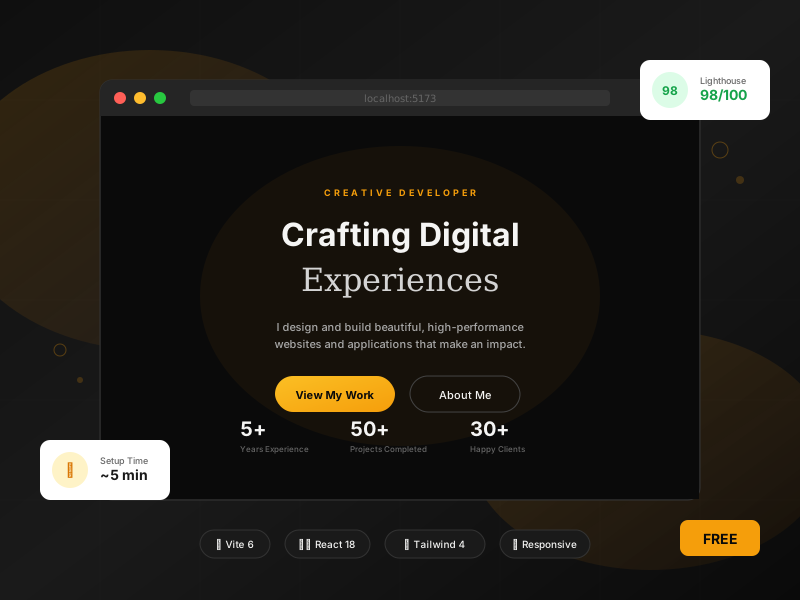
Here’s how the hero section in a well-structured React portfolio handles this with staggered animations that don’t overwhelm — notice each element fades up with a calculated delay so the headline lands first:
<p className="opacity-0 animate-fade-up stagger-1 text-amber-glow text-sm font-semibold tracking-[0.3em] uppercase mb-6">
  Creative Developer
</p>

<h1 className="opacity-0 animate-fade-up stagger-2">
  <span className="block font-display text-5xl md:text-7xl lg:text-8xl font-bold tracking-tight text-bone mb-4">
    Crafting Digital
  </span>
  <span className="block font-serif text-5xl md:text-7xl lg:text-8xl italic text-gradient">
    Experiences
  </span>
</h1>
The stagger-1, stagger-2 classes are utility classes that apply incremental animation-delay values. This is cleaner than inline styles and keeps your JSX readable:
/* In your index.css */
.stagger-1 { animation-delay: 0.1s; }
.stagger-2 { animation-delay: 0.2s; }
.stagger-3 { animation-delay: 0.3s; }
.stagger-4 { animation-delay: 0.4s; }Clients notice polished animation timing even if they can’t articulate why. It signals craft.
2. Projects — 3 Is Enough, 7 Is Too Many
The biggest mistake developers make is listing every project they’ve ever touched. Clients aren’t scanning a portfolio like a hiring manager. They want to see one thing: have you done something like what I need?
Show 3–4 projects. For each one, include:
- A screenshot or live demo link
- A 1–2 sentence description of the business problem it solved (not the tech stack)
- The tech stack as secondary information
- A link to live site or GitHub
If you’re newer and don’t have client work yet, build 2–3 spec projects for real business types — a local restaurant site, a SaaS landing page, a portfolio for a fictional photographer. Spec work is legitimate.
3. An About Section That Builds Trust, Not a Résumé
Clients hire people, not skillsets. Your About section should:
- Mention 1–2 specific things you’re good at
- Say something slightly personal (where you’re based, what you care about)
- Show a real photo (not a logo or abstract avatar)
Keep it to 150 words max. Clients skim.
4. Social Proof — Even One Testimonial Changes Everything
A single testimonial from a satisfied client is worth more than 500 lines of polished code. If you have any past clients, email them and ask for a short quote. Most will say yes.
No clients yet? A recommendation from a colleague, a professor, or someone you built something for free for counts. Something is always better than nothing.
5. A Contact Section That’s Actually Easy to Use
Your contact form should be above the fold of your footer. Not hidden. Not just a mailto link. A real form with name, email, and message — and it should work.
Here’s the key part of a working form in React with proper state management:
const [formData, setFormData] = useState({
  name: '',
  email: '',
  message: '',
})
const [isSubmitting, setIsSubmitting] = useState(false)
const [isSubmitted, setIsSubmitted] = useState(false)

const handleSubmit = async (e) => {
  e.preventDefault()
  setIsSubmitting(true)

  // Wire this to Formspree, EmailJS, or your own API
  await submitForm(formData)

  setIsSubmitting(false)
  setIsSubmitted(true)
}
The isSubmitting state disables the button during submission (preventing double-sends) and shows a spinner. The isSubmitted state shows a confirmation message so the client knows their message went through. Small details, but they matter for professionalism.
Skip These — They’re Slowing You Down
Skills section with every technology you’ve ever touched. Listing 40 tech logos just looks like you’re padding. If you’re a React developer, say you’re a React developer. Your projects show the rest.
Fancy 3D effects that tank mobile performance. If your portfolio takes 4 seconds to load on a phone, you’ve already lost. Use Lighthouse to check performance before launch.
A blog section with zero posts. An empty blog is worse than no blog. Either start with 2–3 real posts or skip it entirely for now.
The File Structure That Actually Works
Here’s the project structure for a lean, production-ready React portfolio — nothing you don’t need, everything you do:
portfolio/
├── src/
│   ├── components/
│   │   ├── Navbar.jsx
│   │   ├── Hero.jsx
│   │   ├── About.jsx
│   │   ├── Projects.jsx
│   │   ├── Contact.jsx
│   │   └── Footer.jsx
│   ├── App.jsx
│   ├── main.jsx
│   └── index.css
├── public/
│   └── favicon.svg
├── vite.config.js
└── package.json
One component per section. No utils/helpers/services folder for a portfolio this size. Flat is fine.
The vite.config.js for this setup is minimal — Tailwind CSS 4 now ships as a Vite plugin, so there’s no separate tailwind.config.js to maintain:
import { defineConfig } from 'vite'
import react from '@vitejs/plugin-react'
import tailwindcss from '@tailwindcss/vite'

export default defineConfig({
  plugins: [
    react(),
    tailwindcss(),
  ],
})
That’s it. No PostCSS config. No content array to mess with. Tailwind 4 handles everything.
Getting It Live This Weekend
Two commands to get started:
npm install
npm run dev
For deployment, Vercel is the fastest option — git push and it’s live in 30 seconds with a custom domain. Netlify, Cloudflare Pages, and GitHub Pages all work fine too.
Custom domain is non-negotiable. yourname.dev costs $12/year. Sending a client to your-portfolio-three-black.vercel.app immediately signals you’re not serious.
If you’d rather skip building the whole thing from scratch, the free portfolio template on newgenui.com gives you all 5 sections pre-built with Vite 6 + React 18 + Tailwind CSS 4 — working contact form, scroll-triggered animations, mobile-first responsive design. It’s what this entire article is based on.
After Launch: How to Actually Use Your Portfolio to Get Clients
Your portfolio doesn’t get you clients by existing. You have to point people to it.
Cold email with context. Find local or niche businesses with bad websites. Send a short email: what you noticed, what you’d fix, a link to your portfolio. Three sentences max. Most freelancers never do this, which means the bar is low.
LinkedIn. Set your headline to something like “React Developer | I build fast websites for [your niche]” and link your portfolio in the featured section. Then actually post something once a week — a screenshot of work, a technical tip, a short opinion. LinkedIn has embarrassingly low developer content competition.
Specific communities. Reddit’s r/forhire and r/freelance, IndieHackers, Contra, and Toptal all have active client demand. A strong portfolio link in your profile does real work here.
One niche wins. “I build React websites” gets lost. “I build React websites for independent restaurants” immediately narrows you to a group of clients who all know each other and all need the same thing. Referrals get easy fast.
The Minimum Viable Portfolio
If you’re paralyzed by perfectionism, here’s the minimum you need to launch:
- Hero with a real value proposition
- Two projects with screenshots and descriptions
- Three sentences about yourself
- A working contact form
- Your name as the domain
That’s it. Ship that first. Iterate after you have real client feedback.
The version with perfect animations and a case study for every project — that comes later, when you have paying clients who can tell you what they actually cared about.
Ready to Stop Building and Start Landing Clients?
Our free portfolio template gives you everything you need: a production-ready Vite 6 + React 18 + Tailwind CSS 4 site with smooth scroll-triggered animations, responsive design, and a working contact form. Over 2,500 developers have already downloaded it.
Two commands. Zero cost. Your portfolio live today.
→ Grab the Free Portfolio Template
No credit card. No upsells. Just clean code you can deploy in minutes.
Already building client websites? Check out our premium industry-specific templates — bakery, restaurant, real estate, cleaning, plumbing, and more. Save 20+ hours per project.